Vibe coding has been all the rage lately. As a tech enthusiast and programmer at heart, I jumped right in to play around with it as soon as I could. While vibe coding has its strengths as well as weaknesses, I’ve found it’s a great way of accelerating the process of building MVP’s or simply getting started on ideas you want to bring to life in a short time span.
I recently embarked on a project of building a fun bug-finding demo for developers. While this post isn’t directly about that demo, I wanted to dive into the process of how I vibe-coded one of the sample apps in that demo and talk about what I learned along the way. And if you haven’t gotten started vibe coding yourself, hopefully this can provide some motivation to help you get started.
I knew I wanted to create a fun app that would be engaging for people as they went through the process of finding bugs in it, bugs that I embedded ahead of time. I had the idea of creating an asteroids style game with a small twist - instead of shooting asteroids you shoot bugs. I called it BugZapper. Perfect! I was ready to get started vibe coding.
The first step was building out the front end. I wanted to use one of the tools that focus on delivering high quality front ends using AI. There were a few of them out there that looked interesting to me but I ended up playing around with Lovable, Bolt.new, and v0. These are all great choices in that they can get you high quality front ends using well known frameworks like nextjs, vite, or really anything you can imagine. Here is the prompt I used:
I want to create an asteroids game in Node.js.

It should have a frontend for the game and a backend for keeping track of the player scores on a scoreboard.

The game should just be a single page. Initially, it should show a top 10 scoreboard and a start game button. When clicking start game the asteroids game should start.

The game should track the players score and show it in the top 10 scoreboard. This can all be done in memory, no need to store the data between shutdowns. Each time the player destroys an asteroid, their score goes up.

It should have typical asteroid controls. I'd like to have a custom image for the ship and maybe a cool graphic for the asteroids that I can change later if I want.

Make the style fun, classic but with a modern feel.
This prompt pretty much one shotted the entire front-end interface for me and gave me a cool app that looked like this:

From here I refined a few minor things in the UI before exporting this over to my IDE and continuing development there. I’d suggest anything front end and UI related you might want to consider adjusting with apps like Bolt or Loveable before exporting and hooking up any backend pieces you might want.
From here I opened Cursor and continued development of the project there. If you haven’t yet used Cursor, it’s a VSCode like IDE with agentic AI coding capabilities built in. Cursor makes it easy to iterate on changes in your application by simply prompting or chatting with the inbuilt AI agent which then modifies or adds code directly. There are additional popular options out there you can explore, like Claude Code or Windsurf among others.
Through using Cursor I was able to then build out more changes and capabilities to my backend and even update some of the images to make it into the BugZapper game that I had planned initially. After a very short time I had a fully functioning game with a front end which communicated to a backend API written in Express.
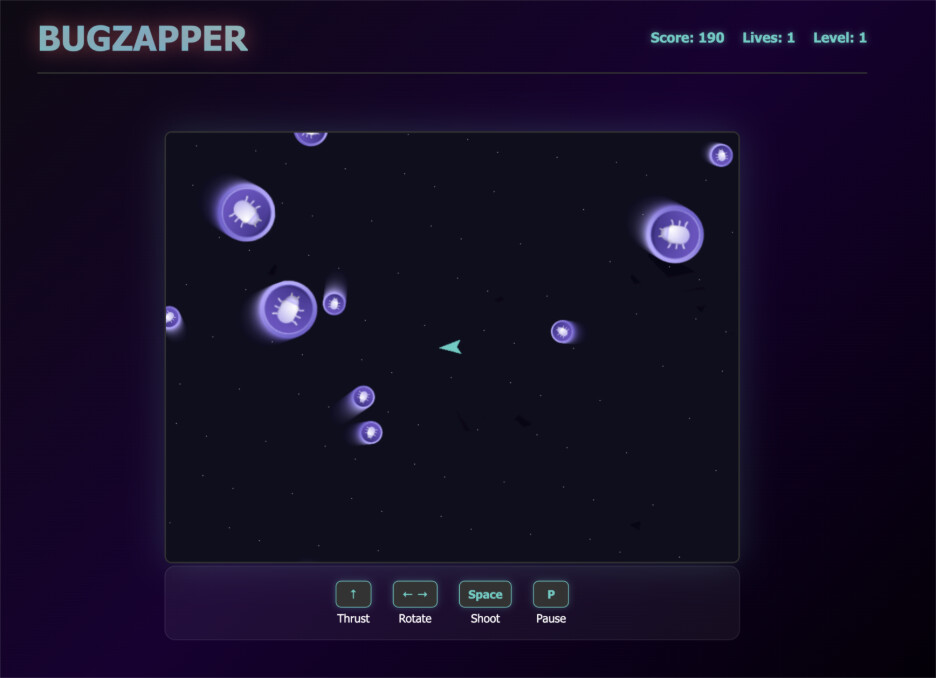
If you want to check out the code for the finished product, you can find it here.
Conclusion and What I Learned
When getting started with vibe coding, decide on the tools you want to use for both your front end and backend. They’re fun to experiment with, so see what is the most intuitive and gives you the best results for your use case. Don’t try to build a massive application all at once, rather, start small and focused and build things out from there. Keep your features small, succinct and easy for an AI to understand.
When prompting, make sure you have a clear and concise prompt. If you don’t get the results you want the first time, think like an AI! Have you left things out that the AI must interpret on its own? Refine your prompt to remove the ambiguity and iterate as many times as you need to. Be specific about what you want, and you’ll usually get good results.
As soon as I had something that I liked, I checked the code into GitHub so that if in the worst case, the AI agent made some changes that broke the app or were difficult to roll back, I could simply revert to a prior commit and be ready to go again. Start using source control as early as you can in the process to make things simpler. You can even check in configuration or readme files that the AI should read and consider when making changes to your app. These can help guide the agent in the right direction.
Vibe coding is a fun and unique way to build a project quickly. It’s not for all use cases, but it can help you to get started with an idea and turn that idea into a functioning app in a very short time frame. You will still need to address things like security, code quality, bugs, and other areas, but with the right prompts and interactions with the AI, you can get some very good results.
Good luck with your own vibe coding experiments!
